Last Will and Testament Template: A Designer's Guide
Creating a Last Will and Testament is one of the most important steps in organizing your life's work and assets. For designers, entrepreneurs, and creative professionals, the process often feels at odds with our visual standards. Standard legal forms are notoriously bland, dense with text, and lack any personal touch. This disconnect can make a difficult task feel even more impersonal. A thoughtfully designed Last Will and Testament Template bridges that gap, offering a structured yet customizable foundation that respects both legal formality and personal aesthetic.
Beyond the Boilerplate: The Anatomy of a Modern Legal Template
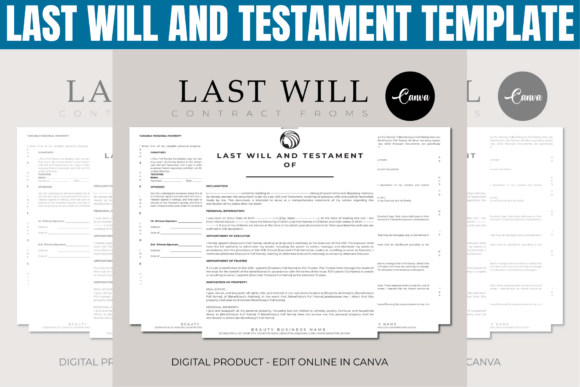
This isn't just another fill-in-the-blank PDF. The core of this offering is a Canva template, a strategic choice for anyone comfortable with basic design tools. The visual character is one of clarity and professionalism. Think clean lines, ample white space, and a logical typographic hierarchy that guides the eye effortlessly from section to section. The default style leans towards a modern serif or a clean sans serif typeface for body text, ensuring high readability for critical information. Headings are typically set in a complementary, slightly bolder weight to establish a clear visual hierarchy.
The personality is serious yet approachable. It avoids the intimidating, archaic look of many legal documents. Instead, it presents itself as a professional design asset. The overall appeal lies in its customizability. You are not locked into a single look. The template's structure is a framework; the aesthetic is yours to command. You can adjust colors to match your brand identity, swap fonts to align with your personal or business style, and reposition elements to create a document that feels uniquely yours. This transforms the task from filling out a form to crafting a personal record.
Strategic Applications for Creative Professionals
Where does a design-forward legal template fit into your workflow? Its utility extends far beyond a single use case. For the entrepreneur or small business owner, this template is a cornerstone of professional estate planning. It ensures your business succession wishes are documented in a format that is both legally sound and presentable to executors and beneficiaries. The ability to include your business logo or use your brand colors adds a layer of consistency and professionalism to your personal legal affairs.
For designers and marketers, it serves a dual purpose. First, it's a practical tool for your own needs. Second, it's a brilliant case study in editorial design for dense, structured content. Observing how the template manages typography, spacing, and flow for legal text can inform your approach to other projects like packaging design (instruction manuals), web design (terms of service pages), or print design (reports and proposals). The principles of clear hierarchy and readability are universal.
Bloggers, publishers, and content creators can leverage the template's structure for more than just a will. Its framework is excellent for creating other formal documents: partnership agreements, content licensing forms, or client contracts. The ability to create a PDF directly from Canva means you can produce polished, client-ready documents in minutes, reinforcing your brand's attention to detail. Even crafters and hobbyists can use it to document the intended distribution of valuable collections, using the customizable elements to create a beautiful, personal record for loved ones.
Practical Guidance: Making the Template Work for You
Choosing and using this template effectively requires a designer's eye. Here’s how to approach it:
- Evaluate the Fit: Before purchasing, consider the template's inherent style. Does its default serif font or sans serif font align with your personal brand? A template with a strong, modern aesthetic might be perfect for a tech entrepreneur but less so for someone seeking a more traditional, conservative look. The visual style should feel authentic to you.
- Master Font Pairing: The template likely includes suggested font pairings. Test them. Canva's vast library allows you to experiment. If the heading font feels too decorative, swap it for a robust display font or a classic serif. Ensure the body text remains a highly readable typeface. The goal is professionalism, not artistic flair.
- Conduct a Readability Audit: Once you've added your text, step back. Print a test page. Can you scan the document easily? Are the headings distinct? Is the line spacing comfortable? Legal documents demand absolute clarity. Adjust font sizes and line heights (leading) until the text is effortless to read.
- Understand the Workflow: Remember, this is a Canva template, not a fillable PDF. Your final step will be to download the finished design as a PDF. For signatures, you will need to either print the document, sign it physically, and scan it, or use a separate digital signature application to add legally binding signatures to your final PDF. Plan for this step in your process.
Ultimately, this Last Will and Testament Template is more than a convenience. It’s an investment in an organized, thoughtful approach to estate planning that aligns with the creative professional's standards. It provides the design assets and structure needed to transform a daunting task into a manageable, even empowering, project of personal branding and legacy organization. By applying your skills in modern typography and layout, you create a document that is not only legally functional but also a clear, personal reflection of your life's work.