Transform Your Digital Content With This 30-Page Canva eBook Template
You have the expertise. You have the content. You have the audience waiting to learn from you. The only thing standing between you and a polished, professional digital product is the design process. For many bloggers, course creators, and entrepreneurs, this is where projects stall. The blank page of a design program can feel intimidating, and hiring a professional designer isn't always in the budget. This is where a thoughtfully designed template becomes more than a shortcut—it becomes a launchpad.
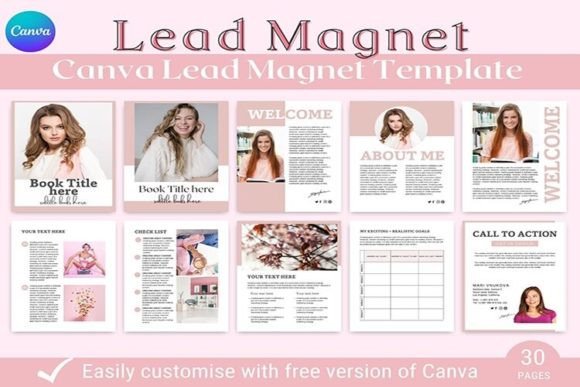
The 30-Page eBook Template for Canva is built specifically for this moment. It’s a comprehensive design system, not just a collection of pretty pages. Crafted within Canva, it leverages the platform’s accessibility while delivering a level of visual sophistication that rivals custom design work. The aesthetic is clean, modern, and intentionally versatile. It avoids trendy distractions in favor of timeless elegance, using balanced white space, a harmonious color palette, and a structured typographic hierarchy that guides the reader’s eye effortlessly from one section to the next. This isn’t a template that shouts; it communicates with clarity and confidence.
More Than Just Pages: A Complete Publishing Framework
What sets this template apart is its understanding of the entire reader journey. It doesn’t just provide content pages; it includes every structural component a functional eBook requires. You’ll find two distinct cover page variations, allowing you to choose the one that best fits your brand’s tone. Two table of contents options help organize your material, while dedicated welcome and about the author pages build crucial rapport with your audience. The fifteen content pages are the workhorses, designed with flexible layouts for text, images, quotes, and lists. Three chapter pages create natural breaks and pace the reading experience, and two clear call-to-action pages ensure your reader knows exactly what step to take next.
This structure directly influences readability and visual hierarchy. The consistent use of heading styles, body text, and accent elements across all 30 pages creates a predictable, comfortable rhythm. Readers subconsciously learn the pattern, making information easier to absorb and retain. For a course creator supplementing lessons or a blogger compiling a guide, this means your valuable content is presented in a way that respects the reader’s time and attention.
Practical Applications for Your Brand and Business
The true value of a design asset is measured by its utility. This 30-page Canva template excels across multiple real-world scenarios. For the entrepreneur, it’s the fastest path to creating a professional lead magnet. Offer a beautifully designed chapter of your expertise in exchange for an email address, and watch your list grow. The course creator can use it to build supplementary workbooks, resource guides, or summary documents that add tangible value to their programs, enhancing the brand identity and perceived quality of the course.
Bloggers and content creators can repurpose popular posts or series into evergreen, downloadable content. This not only provides value to your audience but also establishes you as an authority in your niche. The template’s clean design ensures your work looks polished and professional, which is critical for brand perception. A well-designed eBook signals that you take your work—and your audience—seriously.
Design Flexibility and Brand Consistency
While the template provides a strong foundation, it’s designed for customization. Canva’s interface allows you to easily swap colors, change fonts, upload your own images, and adjust layouts to perfectly match your existing brand identity. This is where understanding basic font pairing and color theory comes in handy. The template likely uses a combination of a strong sans serif font for headings and a highly readable serif font for body text—a classic, reliable pairing for editorial design. You can maintain this structure while injecting your brand’s specific colors and logo.
Consistency across your materials is what builds recognition. When your eBook, your website, your social media graphics, and your course materials all share the same visual language, you create a cohesive experience. This template helps achieve that cohesion efficiently. It’s not a rigid cage but a flexible framework. Whether you’re creating a simple five-page checklist or a comprehensive 30-page guide, the included pages give you the components to build exactly what you need without starting from scratch.
Getting the Most From Your Template
To maximize this asset, start with a clear goal. Are you building a lead magnet, a product, or a bonus resource? Outline your content first, then use the template’s structure to organize it. Don’t feel obligated to use every single page. The two cover variations are there for choice; the fifteen content pages are there for depth. Select the pages that serve your purpose.
Pay attention to the details during customization. Ensure your uploaded images are high resolution. Use the typographic hierarchy already established—keep main headings bold and subheadings distinct. Test the readability of your final PDF on both a desktop screen and a mobile device. The US Letter size (8.5" x 11") is standard for print and digital viewing, but always check how text reflows on smaller screens if your audience primarily reads on phones.
Ultimately, this 30-page eBook template for Canva is a professional tool designed for non-designers. It removes the technical barriers to creating high-quality digital content, allowing you to focus on what you do best: sharing your knowledge, story, or products. In a digital landscape where presentation is intrinsically linked to credibility, having a reliable, elegant design system isn’t a luxury—it’s a strategic advantage for any creator or business owner looking to make a lasting impact.